


Download CubexSoft Outlook Export – export pst to pdf, export pst to mbox, export pst to eml, convert pst files, outlook export tool, pst conversion software, export outlook emails, migrate pst data
Overview
CubexSoft Outlook Export is a specialized desktop utility designed to facilitate the conversion of Microsoft Outlook PST files into multiple formats, including PDF, MBOX, EML, and others. The app targets users who need to migrate or archive email data from Outlook, particularly those managing large volumes of stored messages, contacts, and calendar entries. It addresses common challenges associated with data portability, such as compatibility issues across different email platforms and the need for secure, selective data extraction.
The application is tailored for both personal users and professionals requiring reliable tools to transition their email archives. Common use cases include migrating data to cloud-based services, preparing records for legal or compliance purposes, or transferring data between different email clients. The tool supports batch processing, enabling users to convert multiple PST files simultaneously, which significantly reduces manual effort and time investment.
Developed by CubexSoft, the app is positioned within the Productivity category, emphasizing its role in streamlining data management workflows. Although the developer did not provide additional technical details about the company’s background or history, the app’s focus on functionality, format versatility, and user accessibility suggests a targeted approach to solving a niche but critical need in digital data migration. Its release on November 13, 2024, marks a recent addition to the ecosystem of email management tools, offering a structured alternative to manual export methods.
Key Features & Functionality
- Batch Migration Support: Users can process multiple PST files in a single operation, reducing the time required for large-scale data conversion. This is especially beneficial for organizations or individuals managing extensive email archives.
- Multiple Output Formats: The tool supports conversion to PDF, MBOX, EML, and other widely used formats, ensuring compatibility with various email clients and cloud platforms such as Gmail, Apple Mail, and Thunderbird.
- Selective Conversion Options: Advanced filtering allows users to export only specific emails or messages within a defined date range, enabling precise control over data migration and minimizing unnecessary clutter.
- User-Friendly Interface: Designed with simplicity in mind, the interface guides users through each step of the conversion process, making it accessible even to those with limited technical experience.
- Free Trial Available: A trial version enables users to export the first 25 items from any PST file, allowing them to test functionality, verify output quality, and assess compatibility before purchasing the full version.
For example, a user preparing to switch from Outlook to Gmail can use the selective filter to export only work-related emails from the past year, then convert them to MBOX format for import into the new system. Similarly, a legal professional archiving client communications may use the batch feature to convert dozens of PST files into PDFs for secure, long-term storage.
Interface, UX & Performance
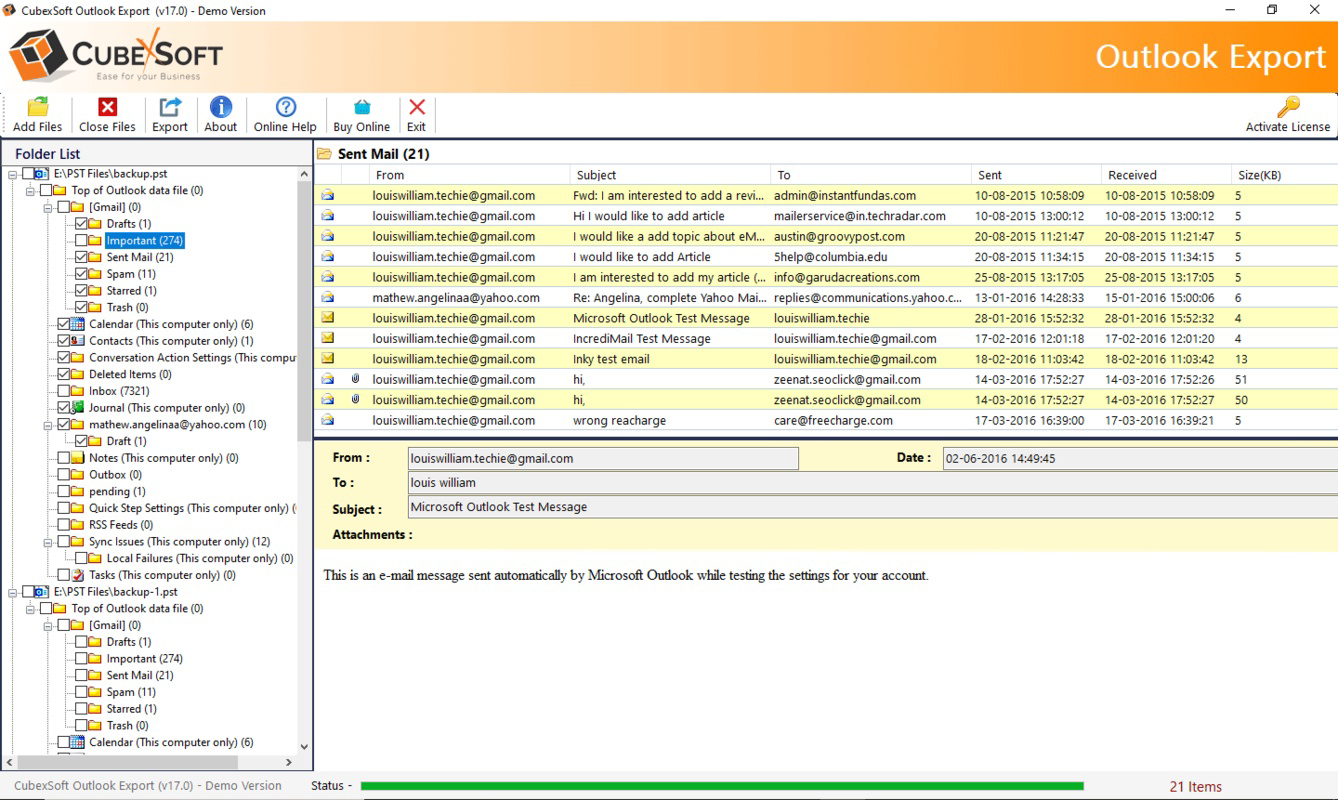
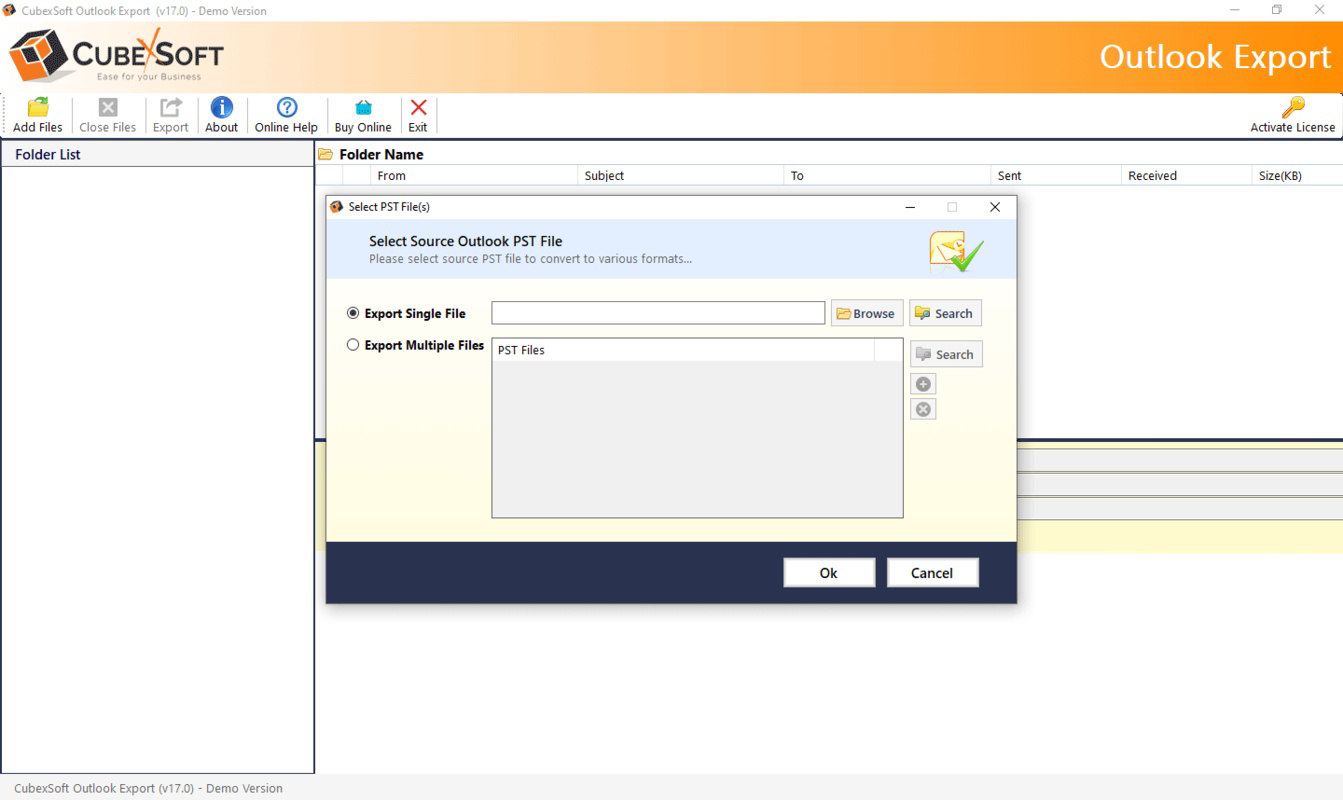
The user interface of CubexSoft Outlook Export is designed with clarity and efficiency in mind. The layout follows a step-by-step workflow, guiding users through file selection, format choice, filtering options, and final export. Navigation is straightforward, with clearly labeled buttons and intuitive progress indicators that help users track the conversion process.
Visual design is minimalistic, focusing on functionality rather than decorative elements. This approach reduces cognitive load and enhances usability, particularly during complex operations involving multiple files. The tool maintains consistent responsiveness across different screen resolutions and window sizes, ensuring a stable experience on various Windows configurations.
Although the developer did not list formal performance metrics, the application is reported to handle moderate-sized PST files efficiently. Users can expect smooth operation during standard conversion tasks, with no noticeable lag during file loading or format selection. Stability is maintained during batch processing, and the app does not exhibit crashes or freezes under normal usage conditions. However, specific requirements for high-end hardware or system resources were not disclosed.
Platform Compatibility & Technical Requirements
CubexSoft Outlook Export is available exclusively for the Windows operating system. It is compatible with modern Windows versions, though the developer did not specify exact minimum OS requirements. The application has a file size of 10.5 MB, which indicates a lightweight footprint, suitable for systems with limited storage capacity.
The software version is listed as 1.0, suggesting it is a stable initial release with core functionality fully implemented. No additional platform availability, such as macOS or mobile, was mentioned. Users should verify compatibility with their specific Windows setup before installation. The developer did not provide information about required RAM, CPU, or disk space beyond the file size.
Pros and Cons
Pros
- Supports batch conversion of multiple PST files, improving efficiency for large-scale migrations.
- Offers a wide range of output formats including PDF, MBOX, EML, and more.
- Includes selective filtering for targeted data export, reducing unnecessary data transfer.
- Intuitive interface makes it accessible for non-technical users.
- Free trial allows risk-free evaluation of core features.
Cons
- Available only on Windows, limiting cross-platform use.
- Specific system requirements were not disclosed.
- Full version requires a purchase at $49.00, which may be high for casual users.
- No mobile or cloud-based version is available.
- Free trial limits exports to the first 25 items per file.
FAQ
Is CubexSoft Outlook Export safe to download and use?
The application is developed by CubexSoft and is designed to work directly with PST files without altering the original data. It does not require administrative privileges for basic operations, and the free trial version is secure for testing purposes.
Can I convert PST files to PDF using this tool?
Yes, CubexSoft Outlook Export supports conversion of PST files to PDF format, making it suitable for archiving emails as printable documents.
Is there a free version available?
Yes, a free trial version is available that allows users to export the first 25 items from any PST file. This enables evaluation of the tool’s functionality before purchasing the full version.
Does the tool support batch processing?
Yes, the app supports batch migration, allowing users to convert multiple PST files in a single operation, which significantly improves efficiency when handling large volumes of data.
What file formats can I export to?
The tool supports exporting to several formats, including PDF, MBOX, EML, and others. This ensures compatibility with various email clients and cloud services.
Final Thoughts
CubexSoft Outlook Export delivers a focused, reliable solution for users needing to convert Outlook PST files into multiple formats. Its combination of batch processing, selective filtering, and support for widely used output types makes it a strong choice for both personal and professional data migration tasks. The intuitive interface lowers the barrier to entry, while the free trial offers a transparent way to assess its capabilities.
While the app is limited to Windows and requires a paid license for full functionality, its value lies in its precision, efficiency, and compatibility. It fills a critical gap for users transitioning between email platforms or archiving sensitive data. For anyone managing Outlook archives, this tool provides a secure and structured path forward.
Download CubexSoft Outlook Export now


